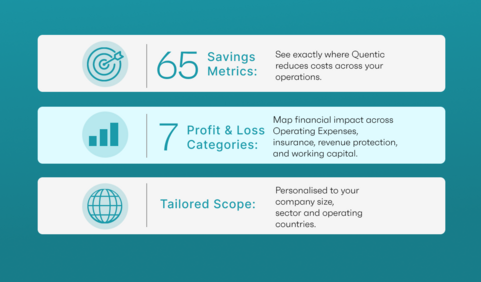
A comprehensive walkthrough of the financial logic driving your assessment. Our specialists map your operational data across all 7 financial categories to unlock the full 65 savings calculations tailored to your business. See your savings breakdown!
Disclaimer: All figures are conservative estimates based on publicly available industry benchmarks and Quentic customer data. They are indicative only and do not constitute a guarantee of financial outcomes. Actual results will vary by organisation, implementation approach and market conditions. This tool is for orientation and business case development purposes only.
See how the ROI Calculator works in 60 seconds
FAQ: Quentic EHS ROI Calculator
The Quentic EHS ROI Calculator is a free tool that estimates the annual financial value your organisation could unlock by replacing manual, fragmented EHS processes with Quentic. It models your potential savings across 65 savings items and 7 Profit & Loss categories, using your company profile and selected EHS inputs to generate a personalised estimate.
You provide a few details about your organisation – size, industry, number of sites, and how your EHS processes run today - and the calculator estimates your potential savings across four areas: reduced operating costs from less manual administration, revenue and productivity gains from reduced downtime, resource and compliance-related savings, and reduced working capital tied up in incident-related risk buffers. Where optional figures are not available, benchmark values are applied automatically. The result is a directional ROI, payback period, and estimated annual value specific to your inputs. For the full calculation logic behind each figure, book a call with a Quentic expert to walk through the assumptions together.
To get started, you only need a small amount of information: your revenue band, headcount, number of sites, ISO certifications held, and country of operation. You can also add incidents per year, hazardous chemicals managed, and EHS staff FTEs if you know them. If you do not, the calculator can apply benchmark values so you can still generate a useful estimate.
That is not a problem. The calculator is designed to work even if you do not know every detail. For the optional inputs, benchmark values are applied automatically if you leave them blank. That means EHS teams can get a useful starting estimate quickly, while finance teams can use the result as a structured basis for deeper validation.
The model converts your inputs into scale factors and applies them across 65 individual business benefit calculations. Each business impact item uses a baseline cost and a conservative improvement factor to estimate potential value. Where published research offers a range, the model is designed to use the lower end of that range rather than the most aggressive scenario.
Your result is built across 7 Profit & Loss categories and 65 savings items. At a high level, this means the model is designed to help you understand how the Quentic AI-enabled platform delivers quantifiable financial value – driving not only operational efficiency, but also optimizing wider business areas such as revenue protection, cost control, insurance-related value, and working capital effects.
Your result is a personalised estimate based on your inputs and applied benchmarks. It is designed to help you build a stronger internal case for change: EHS leaders can use it to translate operational work into financial language, and finance leaders can use it as a structured first view of where value may come from.
The calculator is designed to be transparent and conservative. It uses named model inputs, benchmark values where needed, and a structured set of savings calculations rather than a single black-box multiplier. If you want to review the logic in more detail, you can use the calculator result as a starting point and then book a Financial Value Review with Quentic experts for a deeper walk-through of the assumptions.
Yes. Quentic is independently reviewed on Capterra, one of the most widely used peer-review platforms for business software.
On the platform, Quentic maintains a highly rated 4.7 out of 5 stars profile. Real-world users consistently award the platform top scores for its ease of use and its dedicated customer implementation support, ensuring a reliable deployment that delivers measurable business and financial value.
For the calculation itself, the calculator runs fully client-side in the browser. That means the calculation logic does not require a backend, database, or API call to produce your estimate. If you request a report or a follow-up call, we only use your details to deliver exactly what you asked for – your data won't be saved or stored internally.
Yes. The calculator is designed to help you start an internal conversation. EHS managers can use the result to support a budget case with leadership, and finance leaders can use it as a first-pass estimate before a more detailed validation. If you need a deeper, finance-ready review of the logic behind the estimate, Quentic can support that in a follow-up conversation.